 For the family caregiver
Caring for someone? Keep the numbers and notes straight.
Looking after a family member means bills, reimbursements, appointments and medication notes all at once. This keeps the costs and what the doctor said together: what was spent, what was covered, and what needs doing next.




A look inside
A few real screens, so you know what to expect.
Four things it does
Costs by treatment cycle
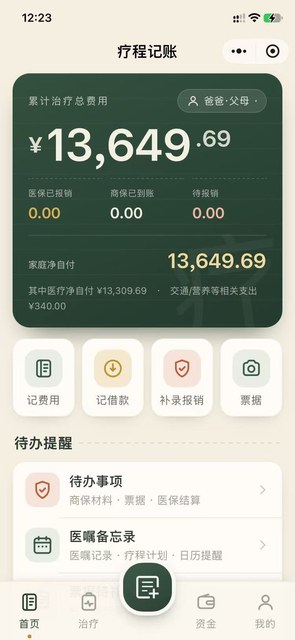
Total treatment cost, insurance paid, amounts received and out-of-pocket spending on one screen — no adding up by hand.
Nothing lost in claims
Claims, receipts and reimbursements each have their own entry, so you can see what was paid and what is still pending.
Medical notes
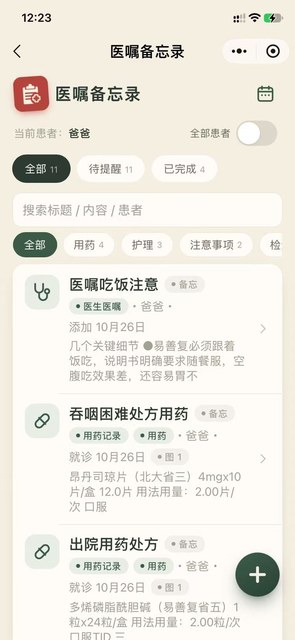
Medication guidance, care instructions and notes from the doctor filed by patient — search a title or a line and find what was said.
A clear to-do list
Appointments, payments and documents to hand in are listed on their own, so each done item can be ticked off.
Back from a follow-up visit
Log the costs from this visit and see them beside the last cycle.
Sorting out reimbursements
Where each receipt, insurer and claim stands, without digging through chat history.
Writing down what the doctor said
“Take with food — empty stomach works poorly.” Note it there and then, no relying on memory at home.
Open the app
Search for Qiban Ledger inside WeChat, or scan the code on this page.
Add a cost or a note
Choose an expense, a loan or a claim; put medical guidance in the notes under the right patient.
Review by cycle
The home screen shows totals and to-dos — open anything you need.
What is Qiban Ledger for?
Does it give medical advice?
Where is my data stored?
Can I keep notes for several people?
Features follow the current version inside the app. This page is updated with each release.
Start with one small app.
Pick the problem you have right now, scan the code, and you are using it within thirty seconds.