 Real readers for your writing
Writing gets better when someone actually reads it.
Publish into the review hall and another writer reads the whole thing, then tells you what landed. You do the same for them. A credit score keeps the exchange honest.




A look inside
A few real screens, so you know what to expect.
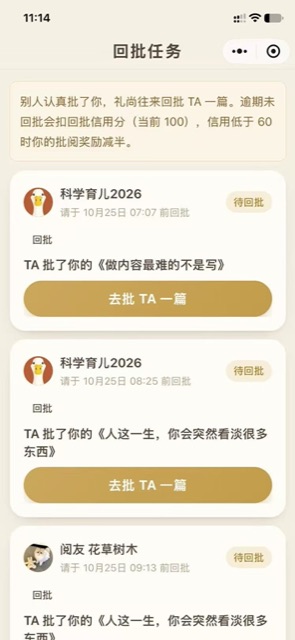
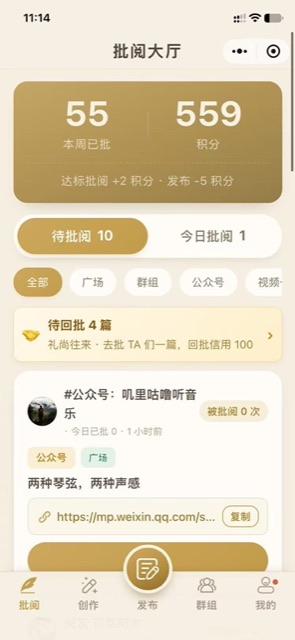
Four things it does
Readers, not bots
Your article enters a review hall where other creators read it end to end and answer in their own words.
Give one, get one
Every review you receive comes with a review you owe. Keep your credit high and your rewards stay whole.
A writing toolkit
Rewrite, layout, account health and breakdown tools sit right next to the review flow, for the part that comes after publishing.
Split by platform
WeChat articles, Xiaohongshu, video channels and groups each get their own queue, so the feedback comes from readers you actually write for.
Three days of writing, no readers
The first useful note is not about grammar. It is about the second paragraph someone read twice.
Is this headline working?
Six honest opinions beat one more round of guessing.
Finding better writers
Reviewing other people is how you end up following the ones who are further along.
Open the review hall
Search for Qiban Review inside WeChat, or scan the code on this page.
Review first
Pick a piece from the queue, read it through, and say what you actually thought.
Then publish yours
Post your article and wait for notes. When a review arrives, return one.
What does Qiban Review do?
What is the review credit score?
Which platforms are supported?
Will my article be made public?
Features follow the current version inside the app. This page is updated with each release.
Start with one small app.
Pick the problem you have right now, scan the code, and you are using it within thirty seconds.